Connecting a PC to TV

The best way to connect a PC to a TV depends on the connectors you have available, we will start by discussing older TVs that don’t have digital inputs such as HDMI or DVI. CRT TVs tend to have scart sockets as the primary connection, to connect a PC to a scart the PC or laptop must have a TV output connector, this will normally be a mini din connector with 4 or 7 pins. The image below shows a typical PC video card, the connector on the left is a DVI connector, the centre is the TV output connector and the connector on the right is the VGA connector.

pc-video-card


If you have a PC with the TV output connector you can connect this using an s-video cable and scart adapter into the TV scart. The s-video cable only has 4 pins but this is compatible with 7 pin s-video sockets on video cards. A couple of points to note, the TV output will only provide the picture and not sound and the scart you connect to on the TV must support s-video, if you connect to a scart that does not support s-video you will get a black and white picture. If your TV scart supports s-video you should be able to select it via the menus, it may also be referred to as Y/C.
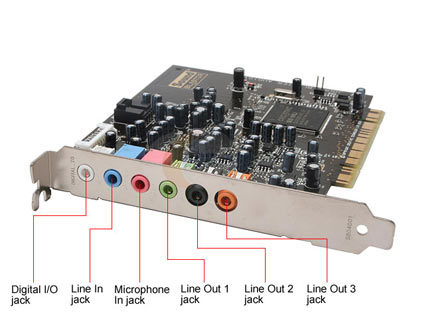
sound-card


To get audio as well a connection is required from the PC sound card to the scart adapter red and white connectors, a typical soundcard is shown above, a connection is required from the green socket to the scart adapter using a 2x phono to 3.5mm jack cable. Once the connections are made you just need to enable the TV ouput in the video card driver settings and make sure the resolution is correct for the TV.

If your TV is an LCD or Plasma it will most likely have a VGA, DVI or HDMI connector. If both your TV and PC or laptop have HDMI connectors then a single HDMI cable is all that is required to connect it to the TV to give video and audio. If both have VGA or DVI then again a VGA cable or DVI Cable can be used but neither will give audio, you will need to make a separate audio connection with a 3.5mm jack to jack cable or 3.5mm jack to 2x phono cable. Other connection options include DVI to HDMI using a DVI to HDMI cable, this also requires a separate audio cable as DVI doesn’t support sound.
HDMI to DVI Cable – No Sound

An HDMI to DVI cable converts 19 pin HDMI to single link DVI-D, the cable is bi-directional so can convert from DVI to HDMI as well. A common issue with this cable is that it gives a picture but no sound, this is because the DVI connection normally only supports video as the name suggests, Digital Visual Interface. To get sound with an HDMI to DVI cable a separate audio cable is required. We say normally only supports video as there some exceptions, for example some PC video cards support DVI Audio and these will provide audio from the DVI connector which can be adapted to HDMI, in general though unless you are specifically using a DVI Audio enabled device you should assume you need a separate audio cable.

HDMI Matrix Switch

What is an HDMI Matrix switch?

It is an HDMI switch that allows 2 or more inputs to be connected to 2 or more outputs simultaneously, for example a 2 x 2 HDMI matrix switch has two inputs and two outputs, we could connect a blu ray DVD to input 1 and a Sky HD box to input  2, output 1 and output 2 would be connected to the displays, eg 2 plasmas or a plasma and a projector. With a matrix switch each output can connect to any input ie we could watch a blu ray DVD on display 1 and 2 or Sky HD on display 1 and blu ray on display 2 etc. A matrix can be configured to perform the same function as an HDMI splitter although they tend to cost more money.

HDMI Splitters

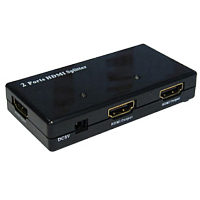
An HDMI splitter is a device that splits an HDMI signal to multiple displays, sometimes called an HDMI Distribution Amplifer. Suppose you wanted to watch Sky HD on 2 TVs, an HDMI splitter could be used to duplicate the input and give 2 identical outputs. The number of outputs provided is referred to as ports or ways, you may see the item described as a 2 port or 2 way if it has 2 outputs. A typical 2 port splitter shown below will cost around £40.

 hdmi-splitter

Displayport Cable becoming more popular

Despite being launched over 2 years ago displayport cables have struggled against the HDMI cable. Displayport has the advantage that there is no licensing required to use the connectors but manufacturers have been slow to adopt it. During recent months the displayport cable seems to have become more popular as manufacturers start to use the connection, big names such as Pioneer and Dell have started to ship products with display port connectivity.

Connecting Sky HD Box to Surround Sound System

Connecting a Sky HD box to a surround system will enhance your viewing experience especially when watching movies, to get the multichannel sound a digital connection must be made from the Sky HD box to the surround amplifier. If the surround sound system has an HDMI input it would seem the most obvious choice would be to connect the box to the amplifer with an HDMI cable and an HDMI cable from the amplifer to the TV. The problem is that Sky HD only supports 2 channel digital sound via the HDMI output hence an optical cable (toslink cable) should be connected from the Sky HD optical output to an optical input on the amplifier, this will provide 5.1 surround sound.

HDMI 1.4 Cables

On 27th May 2009 HDMI Licensing LLC released version 1.4 of the HDMI Cable specification, the main changes include offering networking capability and a return audio channel, details of the individual enhancements are detailed below.

  • HDMI Ethernet Channel
    The HDMI 1.4 cable specification will add a data channel to the HDMI cable and will enable high-speed bi-directional communication. Connected devices that include this feature will be able to send and receive data via 100 Mb/sec Ethernet, making them instantly ready for any IP-based application.
    The HDMI Ethernet Channel will allow an Internet-enabled HDMI device to share its Internet connection with other HDMI devices without the need for a separate Ethernet cable. The new feature will also provide the connection platform to allow HDMI-enabled devices to share content between devices.
  • Audio Return Channel
    The new specification will add an Audio Return Channel that will reduce the number of cables required to deliver audio upstream for processing and playback. In cases where HDTVs are directly receiving audio and video content, this new Audio Return Channel allows the HDTV to send the audio stream to the A/V receiver over the HDMI cable, eliminating the need for an extra cable.
  • 3D Over HDMI
    The 1.4 version of the specification will define common 3D formats and resolutions for HDMI-enabled devices. The specification will standardize the input/output portion of the home 3D system and will specify up to dual-stream 1080p resolution.
  • 4K x 2K Resolution Support
    The new specification will enable HDMI devices to support high-definition (HD) resolutions four times beyond the resolution of 1080p. Support for 4K x 2K will allow the HDMI interface to transmit content at the same resolution as many digital theaters. Formats supported include: 
  • 3840×2160 24Hz/25Hz/30Hz
  • 4096×2160 24Hz


  • Expanded Support For Color Spaces
    HDMI technology now supports color spaces designed specifically for digital still cameras. By supporting sYCC601, Adobe RGB and AdobeYCC601, HDMI-enabled display devices will be capable of reproducing more accurate life-like colors when connected to a digital still camera.
  • Micro HDMI Connector
    The Micro HDMI Connector is a significantly smaller 19-pin connector that supports up to 1080p resolutions for portable devices. This new connector is approximately 50% smaller than the size of the existing HDMI Mini Connector.
  • Automotive Connection System
    The Automotive Connection System is a cabling specification designed to be used as the basis for in-vehicle HD content distribution. The HDMI 1.4 specification will provide a solution designed to meet the rigors and environmental issues commonly found in automobiles, such as heat, vibration and noise. Using the Automotive Connection System, automobile manufactures will now have a viable solution for distributing HD content within the car.

TV Connections

Welcome to TV Connections, here we look at the various ways of connecting a televisions, displays, media devices and home cinema systems etc. For the past 30 years the scart lead has been the primary connection cable for connecting a device to a TV but in the last 3 years everything has changed as we have moved into the digital age.

The scart lead is still in widespread use today but is only capable of carrying an analogue TV signal with a standard definition resolution, most commonly in the UK referred to as 576i (576 lines of interlaced picture).

 A new connection called an HDMI cable was created to carry a high definition TV (HDTV) signal into the new LCD and Plasma TV ranges. HDMI Cables have much smaller plugs than scart and if you’re not familiar with them you could mistake it for a USB connector. The HDMI Cable carries the signal digitally as a stream of 1s and 0s, as such it is much less prone to interference and all but a faulty cable will transfer the sound and picture in perfect quality. Continue reading “TV Connections”

ITV to roll-out HD channel on Freeview

ITV has announced that they will launch an HD channel on the Freeview platform later this year.

A statement from the broadcaster said they had agreed final terms with the BBC (as the operator of Multiplex B which will deliver Freeview HD) to launch an ITV1 HD service on Freeview in advance of the World Cup which gets underway in June 2010.

The new ITV1 HD service will be rolled out across England and Wales with Digital Switchover, starting with Manchester in December 2009 and will be launched ahead of switchover in major cities such as London to enable reception in around half UK homes by the time of the World Cup, according to ITV.

To be able to receive the Freeview HD services viewers will need either need an HD Ready TV set with a new Freeview HD box or a Freeview HD integrated television.

Connecting Sky HD Box to TV

The first generation of Sky HD boxes had both component video and HDMI High Definition outputs, more recent boxes have dropped the component output leaving HDMI as the only HD cable output.

If you have a spare HDMI input on the TV and you are using the TVs internal speakers for sound then the it is very easy to connect the Sky HD box to the TV, a single HDMI cable is all that is required to give you both the video and audio.