LG has switched their power connector to a cloverleaf C5 on recent TVs but are only supplying a 1m cable in the box, luckily a longer length cloverleaf power cable can be bought up to 10m long.
Category: Uncategorized
Which HDMI Cable for 3D?
When choosing an HDMI cable for 3D you only need a high speed hdmi cable or a high speed with ethernet HDMI cable. There is no change in the wiring of the cable for 3D over HDMI so most older cables that were marked as HDMI 1.3 cables will work fine.
CAT6A Patch Cables
CAT6A patch cables are now available to support 10 gigabit ethernet, available in multiple colours and lengths.
HDMI 1.4 Term No Longer Applies to Cables
Despite being in wide spread use the term HDMI 1.4 Cable is now defunct, instead cables are now referred to as standard speed, high speed or high speed with ethernet. If you want to make sure you have all the HDMI 1.4 functionality then you should now buy a high speed hdmi cable with ethernet.
Lindy HDMI Splitters Support 1080p and 3D
New Lindy HDMI Splitter (part codes 38026 and 38027) now support 3D over HDMI as well as 1080p.
Higher speed: HDMI 1.3 increases its single-link bandwidth to 340 MHz (10.2 Gbps) to support the demands of future HD display devices, such as higher resolutions, Deep Colour and high frame rates. In addition, built into the HDMI 1.3 specification is the technical foundations that will let future versions of HDMI reach significantly higher speeds
Deep Colour: HDMI 1.3 supports 10-bit, 12-bit and 16-bit (RGB or YCbCr) colour depths, up from the 8-bit depths in previous versions of the HDMI specification, for stunning rendering of over one billion colours in unprecedented detail
Broader colour space: HDMI 1.3 adds support for “x.v.Color™”, which removes current colour space limitations and enables the display of any colour viewable by the human eye
New mini connector: With small portable devices such as HD camcorders and still cameras demanding seamless connectivity to HDTVs, HDMI 1.3 offers a new, smaller form factor connector option
Lip Sync: Because consumer electronics devices are using increasingly complex digital signal processing to enhance the clarity and detail of the content, synchronization of video and audio in user devices has become a greater challenge and could potentially require complex end-user adjustments. HDMI 1.3 incorporates automatic audio synching capabilities which allow devices to perform this synchronization automatically with total accuracy
New HD lossless audio formats: In addition to HDMI‘s current ability to support high-bandwidth uncompressed digital audio and all currently-available compressed formats (such as Dolby® Digital and DTS®), HDMI 1.3 adds additional support for new lossless compressed digital audio formats Dolby TrueHD and DTS-HD Master Audio™
The splitter coupled with a high speed hdmi cable gives perfect 3D to more than 1 screen.
Bush BFSAT01HD Freesat HD
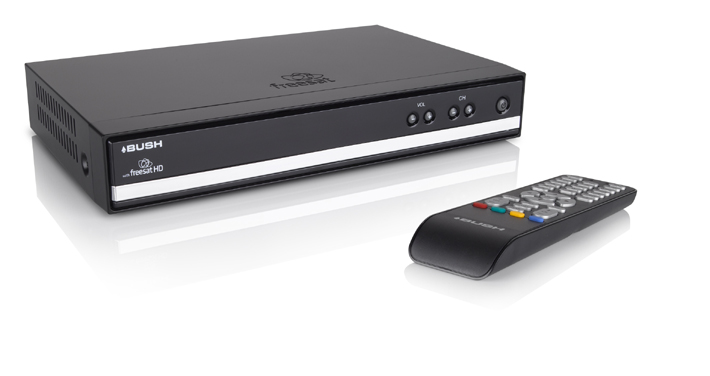
All the benefits of a digital box, plus up to 70 hours a week of HD programmes, subscription-free. If you have an HD Ready TV or are thinking of buying one, this is a great option.
- Over 140 great digital TV and radio channels and services
- Free HD programmes from the BBC and ITV
- 8-day On Screen Programme Guide
- Interactive TV
- Fully interactive with LAN Port for future connection to Broadband
- 5.1 Surround Sound Digital Audio Out socket allowing easy connection to your Home Cinema System
- Parental control
- Subtitles and Audio Description
- HDMI – digital interface for perfect transmission of picture and sound
- Contains HD freesat Digital Box, Scart Cable, Power Adapter, 2 x AAA Batteries, Quick Start Guide, User Guide, Remote Control
- Auto detection of new channels or software – no need to ever re-tune
- One payment, no subscription, no bills
Connections
- 1 x HDMI Socket
- 2 x Scart Sockets
- LNB In and Out
- Ethernet
- SPDIF – Digital Audio Out
Dimensions W: 257mm D: 165mm H: 42mm Weight: 1kg
Apple Mac Mini Displayport raises compatibility concerns
Apple’s decision to remove the DVI port from the MacBook, MacBook Air and MacBook Pro in favor of Mini DisplayPort, and to offer Mini DisplayPort as the only video connector for the new 24-inch Cinema Display, has raised current compatibility concerns. This has a number of implications:- Continue reading “Apple Mac Mini Displayport raises compatibility concerns”
Lindy HDMI Extender Sends HDMI Over 300m
High end cable manufacturer Lindy Electronics have announced a fibre optic HDMI extender that can send an HDMI signal up to 300m using a single SC duplex multimode fibre optic cable. Continue reading “Lindy HDMI Extender Sends HDMI Over 300m”
Older LCD and Plasma TVs Stuck with SD
Owners of some older plasma and LCD TVs without HDMI inputs are finding themselves stuck with watching Standard Definition (SD) pictures from HD sources even though they have high resolution panels. Early panels supported High Definition TV HDTV via the component video inputs but many HD devices including Sky HD boxes have now dropped the component video output only leaving HDMI. HDMI to component video converters are available but the HDMI content protection system HDCP forces the component video output down to 480i resolution.
Connecting a PC to TV
The best way to connect a PC to a TV depends on the connectors you have available, we will start by discussing older TVs that don’t have digital inputs such as HDMI or DVI. CRT TVs tend to have scart sockets as the primary connection, to connect a PC to a scart the PC or laptop must have a TV output connector, this will normally be a mini din connector with 4 or 7 pins. The image below shows a typical PC video card, the connector on the left is a DVI connector, the centre is the TV output connector and the connector on the right is the VGA connector.

If you have a PC with the TV output connector you can connect this using an s-video cable and scart adapter into the TV scart. The s-video cable only has 4 pins but this is compatible with 7 pin s-video sockets on video cards. A couple of points to note, the TV output will only provide the picture and not sound and the scart you connect to on the TV must support s-video, if you connect to a scart that does not support s-video you will get a black and white picture. If your TV scart supports s-video you should be able to select it via the menus, it may also be referred to as Y/C.
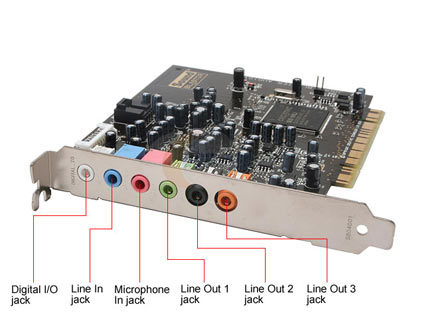
To get audio as well a connection is required from the PC sound card to the scart adapter red and white connectors, a typical soundcard is shown above, a connection is required from the green socket to the scart adapter using a 2x phono to 3.5mm jack cable. Once the connections are made you just need to enable the TV ouput in the video card driver settings and make sure the resolution is correct for the TV.
If your TV is an LCD or Plasma it will most likely have a VGA, DVI or HDMI connector. If both your TV and PC or laptop have HDMI connectors then a single HDMI cable is all that is required to connect it to the TV to give video and audio. If both have VGA or DVI then again a VGA cable or DVI Cable can be used but neither will give audio, you will need to make a separate audio connection with a 3.5mm jack to jack cable or 3.5mm jack to 2x phono cable. Other connection options include DVI to HDMI using a DVI to HDMI cable, this also requires a separate audio cable as DVI doesn’t support sound.